
使用的工具
Trea.ai:字节跳动旗下开发工具,目前看免费使用Claude3.7,需排队,凌晨不用。国内版好像用不了Claude3.7,所以去下国际版。
使用方法
- 在WordPress主题目录新建一个php文件,重命名为:page-archives.php
- 将文章结尾的代码放入page-archives.php中
- 在WordPress后台新建页面,页面模板选择:文章归档模板
- 保存并发布页面即可
根据不同主题,可能需要进行不同的样式调整,可以使用AI解决。
代码实现
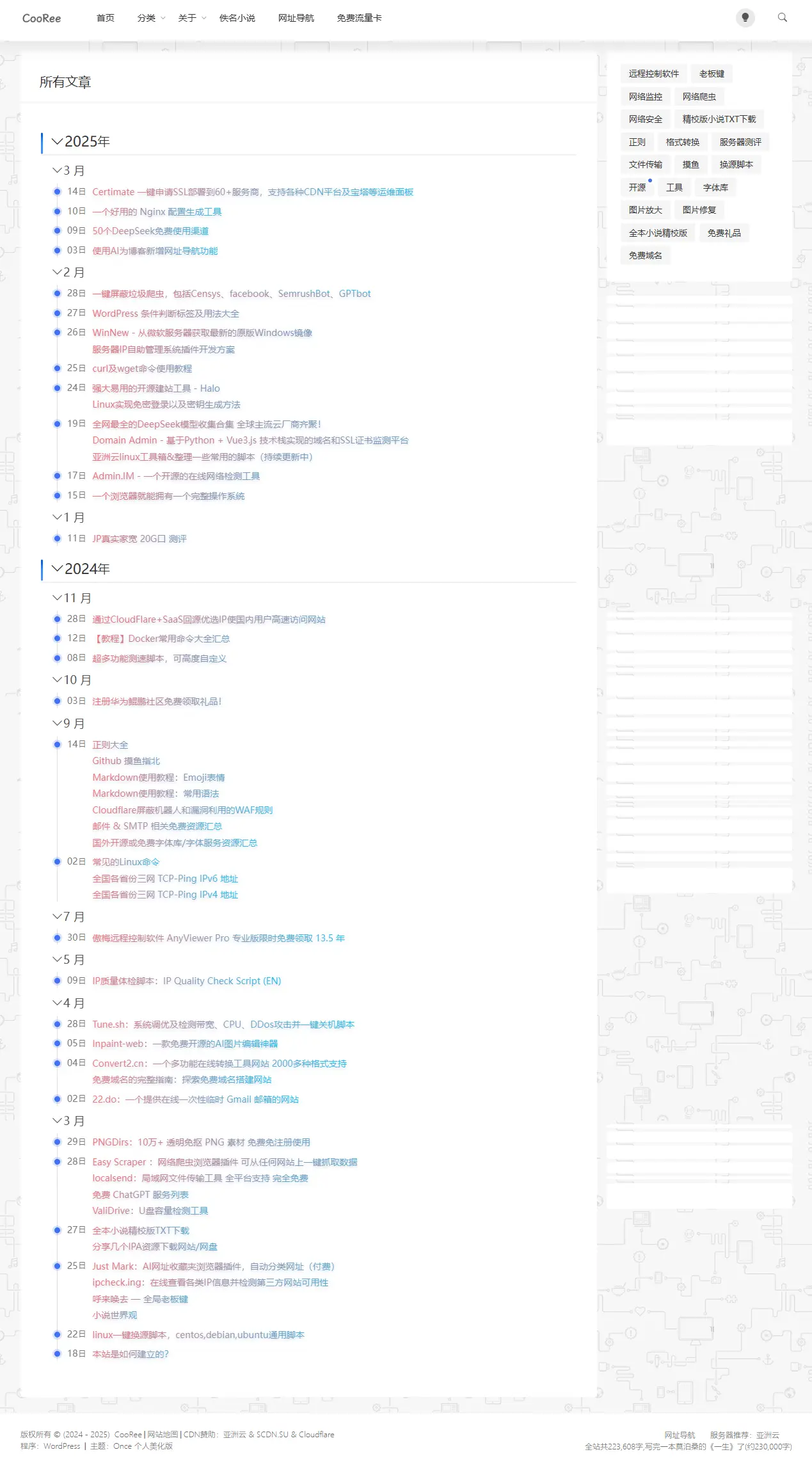
- 年份月份可收缩或展开
- 日期前方时间轴样式
- 年份为H2标签,月份为H3标签,可适配部分文章目录代码
演示图
代码
<?php
/**
 * Template Name: 文章归档模板
 */
get_header(); ?>

<section class="index_area">
    <div class="container">
        <div class="row g-3">
            <div class="col-lg-9">
                <div class="post_container_title">
                    <h1><?php the_title(); ?></h1>
                </div>
                <div class="post_container mb-4">
                    <article class="wznrys archives-container">
                        <?php
                        // 获取所有文章
                        $posts_by_year = array();
                        $all_posts = get_posts(array(
                            'numberposts' => -1,
                            'post_status' => 'publish',
                            'post_type' => 'post',
                            'orderby' => 'date',
                            'order' => 'DESC',
                        ));

                        // 按年、月、日组织文章
                        foreach ($all_posts as $post) {
                            $year = date('Y', strtotime($post->post_date));
                            $month = date('m', strtotime($post->post_date));
                            $day = date('d', strtotime($post->post_date));

                            if (!isset($posts_by_year[$year])) {
                                $posts_by_year[$year] = array();
                            }

                            if (!isset($posts_by_year[$year][$month])) {
                                $posts_by_year[$year][$month] = array();
                            }

                            if (!isset($posts_by_year[$year][$month][$day])) {
                                $posts_by_year[$year][$month][$day] = array();
                            }

                            $posts_by_year[$year][$month][$day][] = $post;
                        }

                        // 输出归档内容
                        foreach ($posts_by_year as $year => $months) {
                            echo "<div class='archive-year'>";
                            echo "<h2 class='year-title'><i class='toggle-icon bi bi-chevron-down'></i>$year<small>年</small></h2>";
                            echo "<div class='year-content'>";

                            foreach ($months as $month => $days) {
                                echo "<div class='archive-month'>";
                                echo "<h3 class='month-title'><i class='toggle-icon bi bi-chevron-down'></i>" . date_i18n('F', mktime(0, 0, 0, $month, 1, $year)) . "</h3>";
                                echo "<div class='archive-days month-content'>";

                                foreach ($days as $day => $posts) {
                                    echo "<div class='archive-day'>";
                                    echo "<div class='timeline-dot'></div>";
                                    echo "<span class='day-dot'>$day<small>日</small></span>";
                                    echo "<div class='archive-posts'>";

                                    foreach ($posts as $post) {
                                        echo "<div class='archive-post-item'>";
                                        echo "<a href='" . get_permalink($post->ID) . "'>" . $post->post_title . "</a>";
                                        echo "</div>";
                                    }

                                    echo "</div>";
                                    echo "</div>";
                                }

                                echo "</div>";
                                echo "</div>";
                            }

                            echo "</div>";
                            echo "</div>";
                        }
                        ?>
                    </article>
                </div>
            </div>
            <?php get_sidebar() ?>
        </div>
    </div>
</section>

<style>
/* 归档页面样式 */
.archives-container {
    padding: 15px 0;
}

.archive-year {
    margin-bottom: 10px; /* 减小年份底部间距 */
}

.year-title, .month-title {
    cursor: pointer;
    user-select: none;
}

.toggle-icon {
    margin-right: 5px;
    transition: transform 0.3s ease;
}

.toggle-icon.collapsed {
    transform: rotate(-90deg);
}

.archive-year h2 {
    font-size: 22px;
    padding-bottom: 5px; /* 减小内边距 */
    border-bottom: 2px solid #f0f0f0;
    margin-bottom: 5px; /* 减小底部间距 */
    position: relative;
    display: flex;
    align-items: center;
}


.archive-month {
    margin-left: 12px;
    margin-bottom: 5px; /* 减小月份底部间距 */
}

.archive-month h3 {
    font-size: 18px;
    margin-bottom: 5px; /* 减小底部间距 */
    color: #555;
    position: relative;
    padding-left: 0; /* 移除左侧内边距,因为不再需要为小蓝点留空间 */
    display: flex;
    align-items: center;
}


.toggle-icon {
    margin-right: 5px;
    transition: transform 0.3s ease;
    /* 调整月份前面的向下箭头,使其与日期前的时间轴灰色线对齐 */
    position: relative;
    left: 4.5px; /* 调整位置,使箭头尖尖对准时间轴灰色竖线 */
}

.archive-days {
    margin-left: 9px;
    position: relative;
}

.archive-days:before {
    content: '';
    position: absolute;
    left: 4px;
    top: 0;
    bottom: 0;
    width: 1px;
    background-color: #e0e0e0;
    z-index: 1;
}

.archive-day {
    display: flex;
    align-items: flex-start;
    margin-bottom: 8px;
    position: relative;
    padding-left: 20px;
}

.timeline-dot {
    position: absolute;
    left: 0;
    top: 7px;
    width: 9px;
    height: 9px;
    border-radius: 50%;
    background-color: #4270f5;
    z-index: 2;
    box-shadow: 0 0 0 3px rgba(66, 112, 245, 0.2);
}

.day-dot {
    font-size: 14px;
    color: #777;
    margin-right: 10px;
    flex-shrink: 0;
    display: inline-flex;
    align-items: center;
}

.day-dot small {
    font-size: 12px;
    margin-left: 1px;
}

.archive-posts {
    flex-grow: 1;
}

.archive-post-item {
    margin-bottom: 3px;
}

.archive-post-item:last-child {
    margin-bottom: 0;
}

.archive-post-item a {
    color: #333;
    transition: all 0.3s ease;
    font-size: 14px;
    line-height: 1.5;
}

.archive-post-item a:hover {
    color: #4270f5;
}

.wznrys h3.month-title::before {
    content: none;
}

/* 暗夜模式样式 */
.dark .archive-year h2 {
    border-bottom-color: #2d2d2d;
    color: #fff;
}

.dark .archive-month h3 {
    color: #ccc;
}

.dark .day-dot {
    color: #aaa;
}

.dark .archive-days:before {
    background-color: #444;
}

.dark .archive-post-item a {
    color: #c9c9c9;
}

.dark .archive-post-item a:hover {
    color: #4270f5;
}

/* 优化文章目录悬浮窗中年份和月份之间的距离 */
.year-content {
    padding-top: 3px;
    padding-bottom: 3px;
}

.month-content {
    padding-top: 2px;
}

/* 文章目录悬浮窗样式优化 */
.toc-container .archive-year,
.toc-container .year-title,
.toc-container .archive-month,
.toc-container .month-title {
    margin-bottom: 2px;
}

.toc-container .year-title {
    font-size: 16px;
    padding-bottom: 1px;
    border-bottom: 1px solid #f0f0f0;
}

.toc-container .year-title:after {
    width: 30px;
    height: 1px;
}

.toc-container .archive-month {
    margin-left: 6px;
}

.toc-container .month-title {
    font-size: 14px;
    padding-left: 6px;
}

/* .toc-container .month-title:before {
    width: 4px;
    height: 4px;
} */

.toc-container .archive-days {
    margin-left: 8px;
}

.toc-container .archive-day {
    margin-bottom: 3px;
    padding-left: 12px;
}

.toc-container .timeline-dot {
    width: 6px;
    height: 6px;
    top: 6px;
    box-shadow: 0 0 0 2px rgba(66, 112, 245, 0.2);
}

.toc-container .day-dot {
    font-size: 12px;
}

.toc-container .archive-post-item {
    margin-bottom: 2px;
}

.toc-container .archive-post-item a {
    font-size: 12px;
    line-height: 1.3;
}

/* 设置toc-item的padding为0 */
li.toc-item {
    padding: 0;
}
@media (max-width: 768px) {
    .archive-year h2 {
        font-size: 20px;
        padding-bottom: 0px;
    }

    .archive-month {
        margin-left: 10px;
    }

    .archive-month h3 {
        font-size: 16px;
    }

    .archive-days {
        margin-left: 8px;
    }

    .day-dot {
        font-size: 13px;
    }

    .archive-post-item a {
        font-size: 13px;
    }
}
</style>

<script>
document.addEventListener('DOMContentLoaded', function() {
    // 年份点击事件
    const yearTitles = document.querySelectorAll('.year-title');
    yearTitles.forEach(title => {
        title.addEventListener('click', function() {
            const content = this.nextElementSibling;
            const icon = this.querySelector('.toggle-icon');

            if (content.style.display === 'none') {
                content.style.display = 'block';
                icon.classList.remove('collapsed');
            } else {
                content.style.display = 'none';
                icon.classList.add('collapsed');
            }
        });
    });

    // 月份点击事件
    const monthTitles = document.querySelectorAll('.month-title');
    monthTitles.forEach(title => {
        title.addEventListener('click', function(e) {
            e.stopPropagation(); // 防止事件冒泡到年份
            const content = this.nextElementSibling;
            const icon = this.querySelector('.toggle-icon');

            if (content.style.display === 'none') {
                content.style.display = 'block';
                icon.classList.remove('collapsed');
            } else {
                content.style.display = 'none';
                icon.classList.add('collapsed');
            }
        });
    });
});
</script>

<?php get_footer(); ?>